POZTEK Time
Schedule the team, let them clock in, hand over accurate hours.
Your staff clock in with their PIN on a tablet or on the ZP till. You compare planned and actual hours, approve them, and the monthly summary goes to payroll.
Expected launch: Q4 2026Runs on Windows, web browser
16:00 - 23:307h00
Sophie Bonvin · Service
09:30 - 14:304h30
Marco Bianchi · Kitchen
What POZTEK Time does
09:30 - 18:308h00
Léa Morel · Service
Schedule
The weekly schedule, grouped by role and published to the team when it is ready.
- Inès CarvalhoIn since 08:13
Clock in
On a tablet or on the ZP till, with a PIN. Even without internet.
Missing clock-out
Julien Rochat, Saturday 10 October.
Check
Every gap from the schedule shows up, and nothing is fixed silently.
Inès Carvalho
- Worked
- 145h36
- Difference from contract
- +5h36
ExcelPDF
Hand over
The month's hours, ready for payroll as Excel, CSV or PDF.
The weekly schedule, ready in minutes.
Drag shifts, colour-code roles and keep each person's total next to their contract. When everything is ready, publish: the team sees its schedule.
Shifts and breaksEach shift carries its hours, its break and its role.
Grouped by roleService, kitchen, bar: each day's coverage reads at a glance.
Published when readyYou work in draft, the team only sees the published version.
09:30 - 18:308h00
Léa Morel · Service
08:00 - 16:308h00
Inès Carvalho · Kitchen
17:00 - 23:306h00
Julien Rochat · Bar
A name, a PIN, clocked in.
On the tablet, the employee taps their name, enters their PIN and clocks in. The time clock reminds them of today's shift and, at clock-out, shows the length of the shift and their monthly total.
Without internetClock-ins are sent as soon as the connection is back, without duplicates.
On the ZP till tooA Time clock button on the ZP POS sign-in screen, using the till PIN.
Who is in, liveThe back office home screen shows who is working and who is expected.
Sophie Bonvin
Not clocked in yet.
Planned today: 16:00 to 23:30, Service
Clock inPlanned next to actual, day after day.
Each day shows clocked hours above planned hours. A discrepancy or a missed clock-out stands out straight away, and the day is approved once it is right.
Discrepancies flaggedLate arrival, early departure, overtime or unannounced absence.
Corrections loggedA clock-in is never deleted: the correction is added with its author and reason.
Absences creditedIllness, accident, holiday or training, credited against planned hours.
| Tue | Wed | Thu | Fri | Sat | |
|---|---|---|---|---|---|
| Sophie | Compliant7h027h00 | Discrepancy7h477h00 | Sick | Compliant7h037h00 | |
| Julien | Compliant6h036h00 | Discrepancy6h446h00 | Missing clock-out0h006h00 | ||
| Inès | Compliant8h028h00 | Compliant8h048h00 | Discrepancy8h418h00 | Compliant8h018h00 | Compliant8h008h00 |
- Compliant
- Discrepancy
- Missing clock-out
- Absence
Labour Act rules, checked before you publish.
Before the schedule reaches the team, POZTEK Time checks it against the Labour Act rules you switch on and flags anything that goes beyond them.
Rest, breaks and spanRest between two working days, length of the day and breaks according to hours worked.
Week, Sundays and nightsLength of the week, days in a row, free half-day, Sundays and nights in the year.
Warn or blockPresets for hospitality or retail, adjustable thresholds, publishing blocked if you wish.
Daily rest too short
Julien Rochat: 9 h rest between Friday 23:30 and Saturday 08:30, instead of 11 h.
EditPublish anyway
Free half-day missing
Inès Carvalho has no free half-day this week.
A clean month for payroll.
The summary splits hours into day, evening and night, counts Sundays and cantonal public holidays, adds absences and shows the difference from the contract. You export it, then lock the month.
Excel, CSV or PDFFor your accountant or payroll software. No salary is stored in POZTEK Time.
Timesheet to signOne PDF per employee, to be signed before handing over.
Locked monthReopening it requires a reason, which is logged.
Inès Carvalho · September 2026
- Worked
- 145h36
- Holiday credited
- 40h00
- Contract
- 180h00
- Difference
- +5h36
- Day · evening · night
- 145h36 · 0h00 · 0h00
ExcelCSVPDF
And everything that comes with it.
Cantonal public holidays
Public holidays for all 26 cantons, marked on the schedule, the clock-ins and the summary.
Several locations
One employee can work at several outlets of the same business.
Email alerts
A daily summary of issues, sent to the addresses you choose.
Works without a ZP till
A tablet and the POZTEK Cloud back office are enough. With ZP POS, staff can also clock in on the till.
See POZTEK Time for real
1 / 5
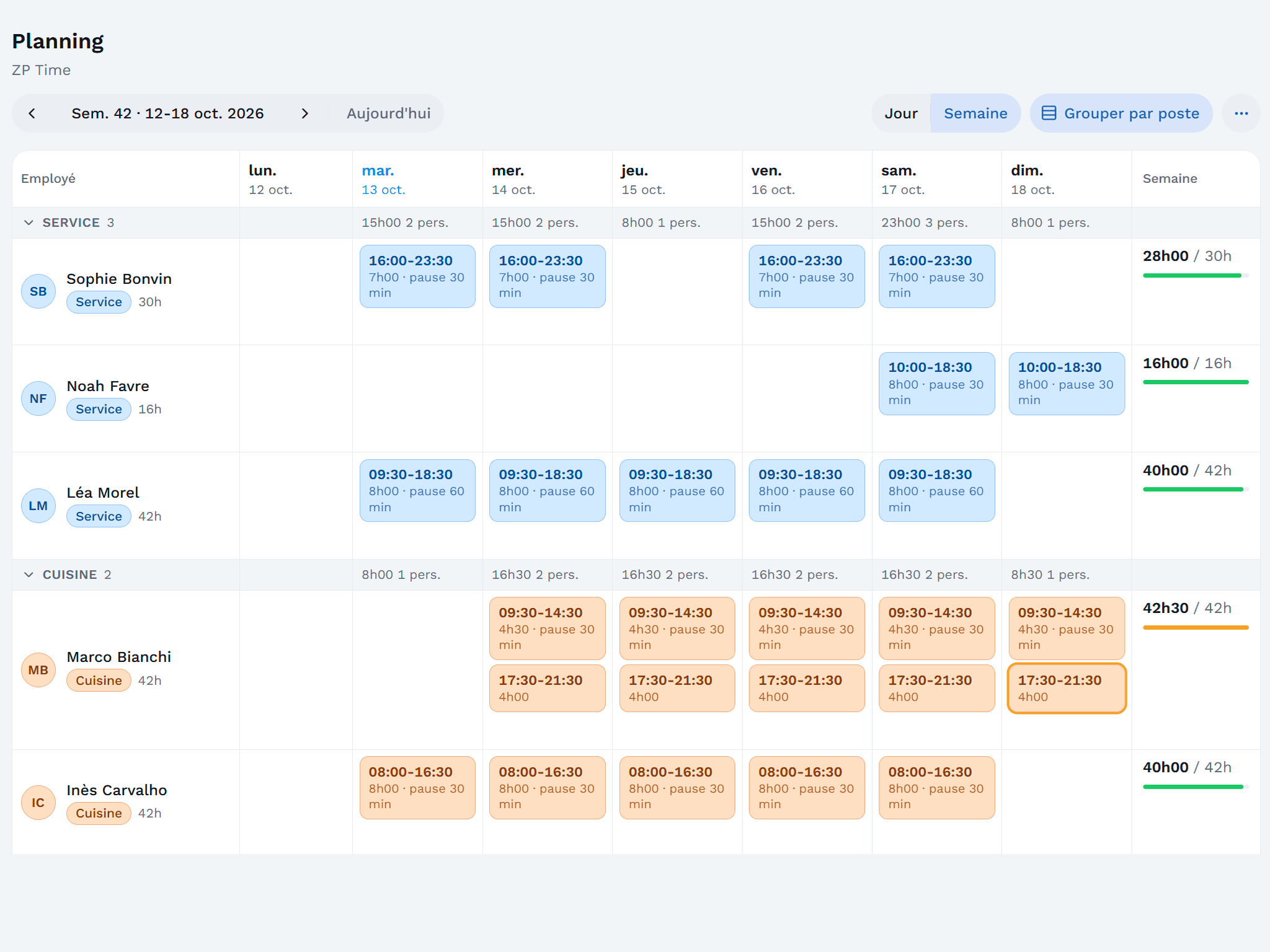
The weekly schedule, grouped by role: each shift with its break, and each employee's total next to their contracted hours. 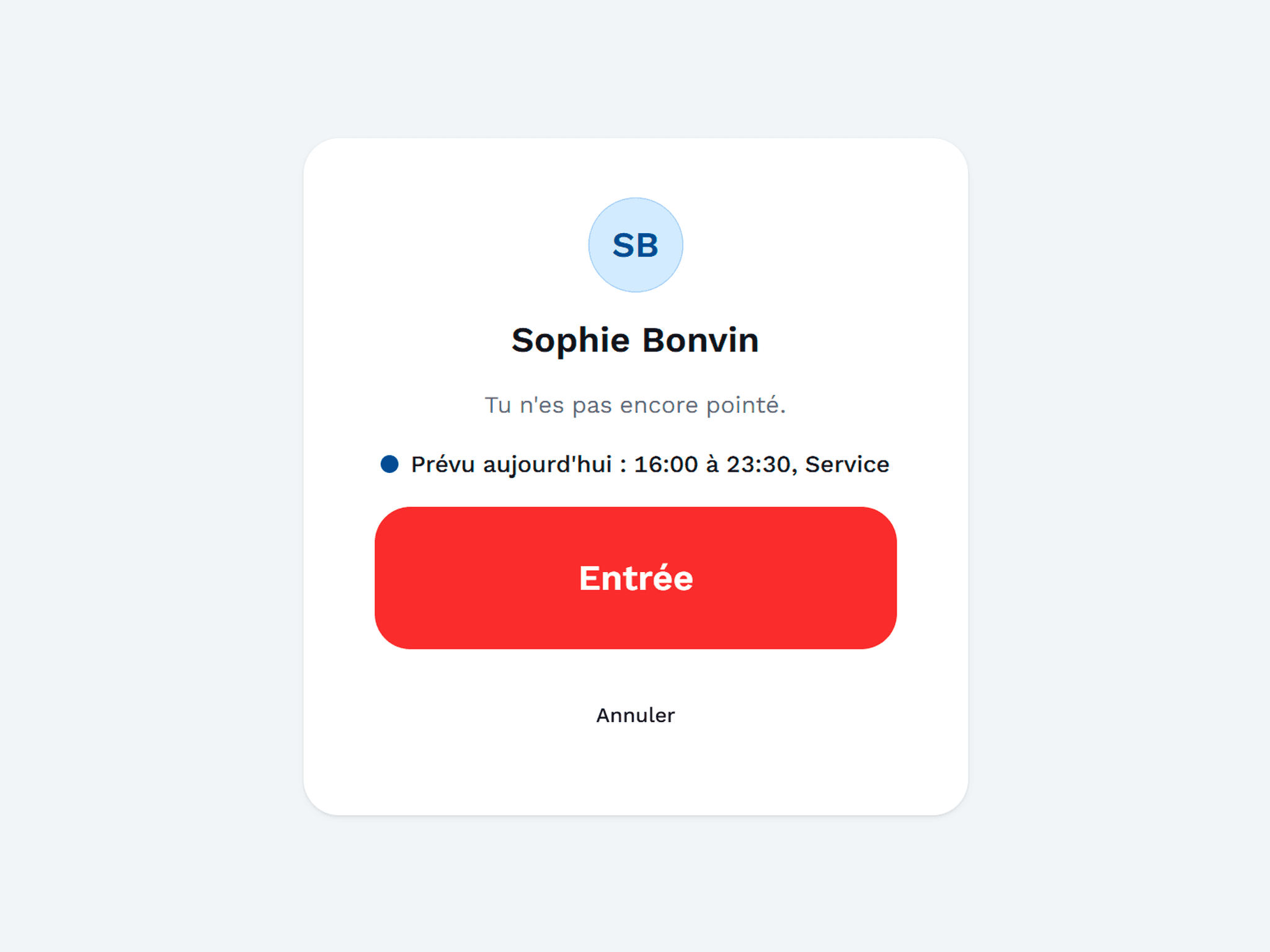
At the time clock, the employee sees today's shift before clocking in. 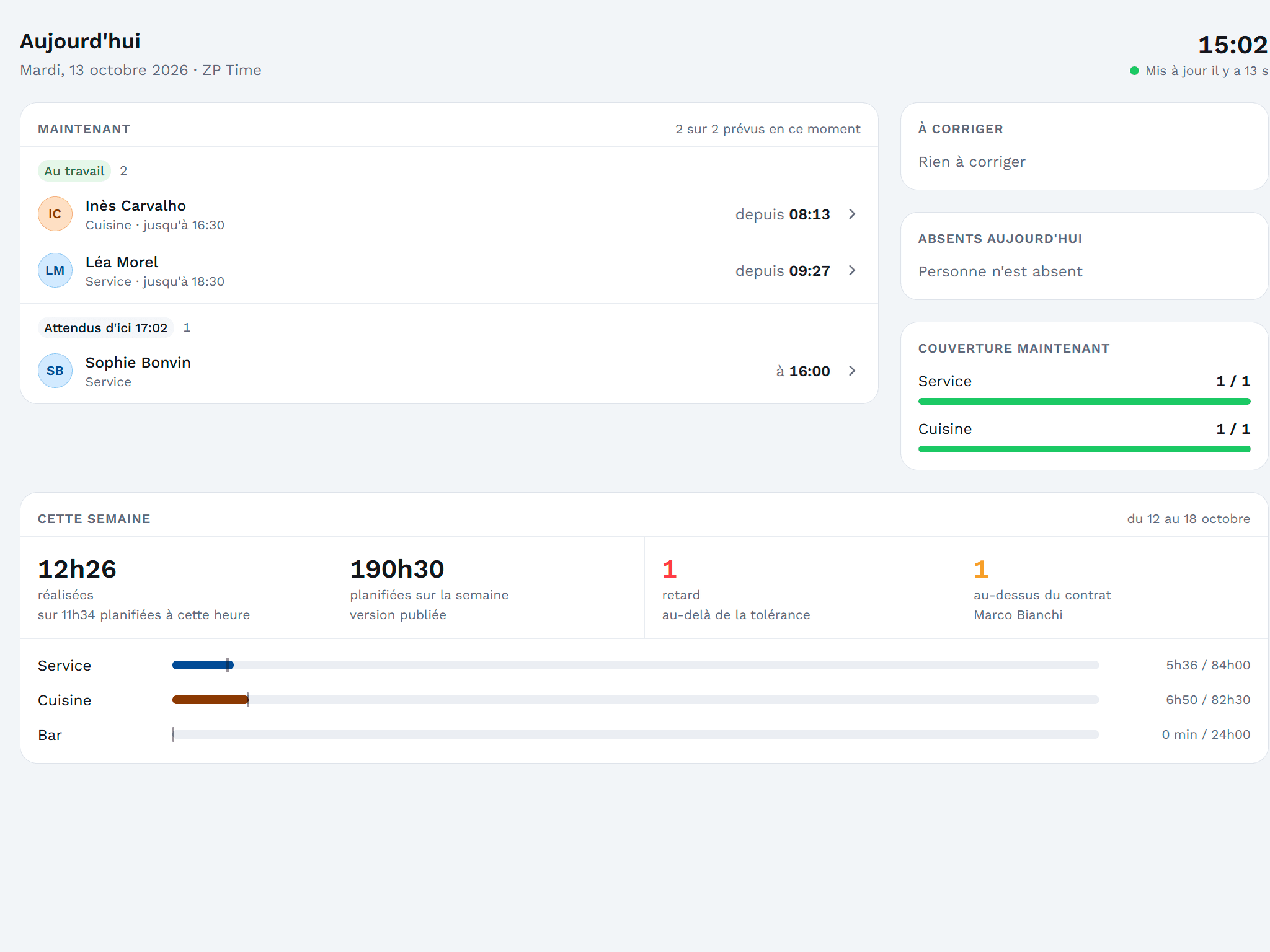
The live home screen: who is in, who is expected, coverage for each role and the week's hours. 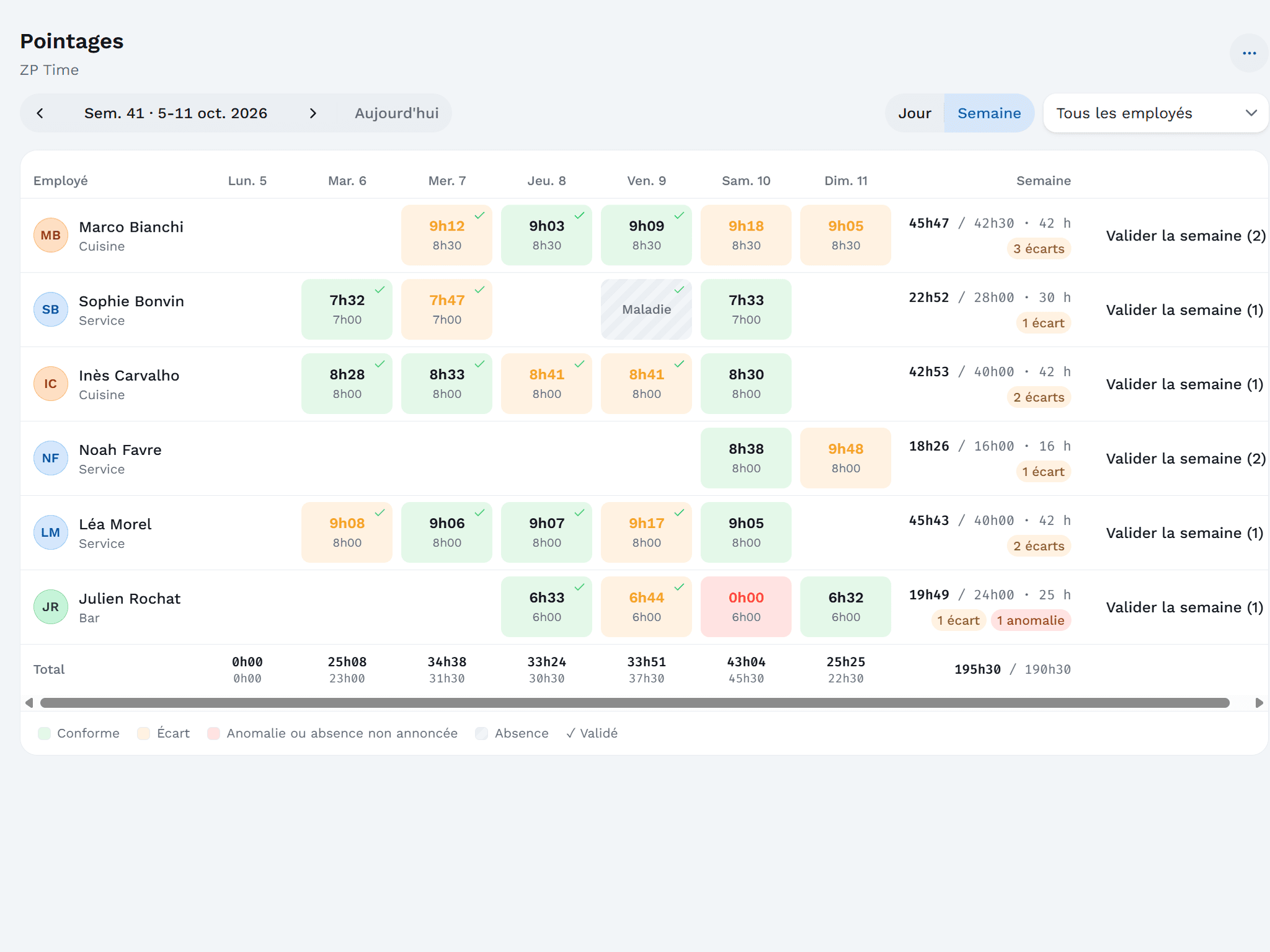
The clocked week next to the schedule: compliant, discrepancy or error is visible at a glance, and each day gets approved. 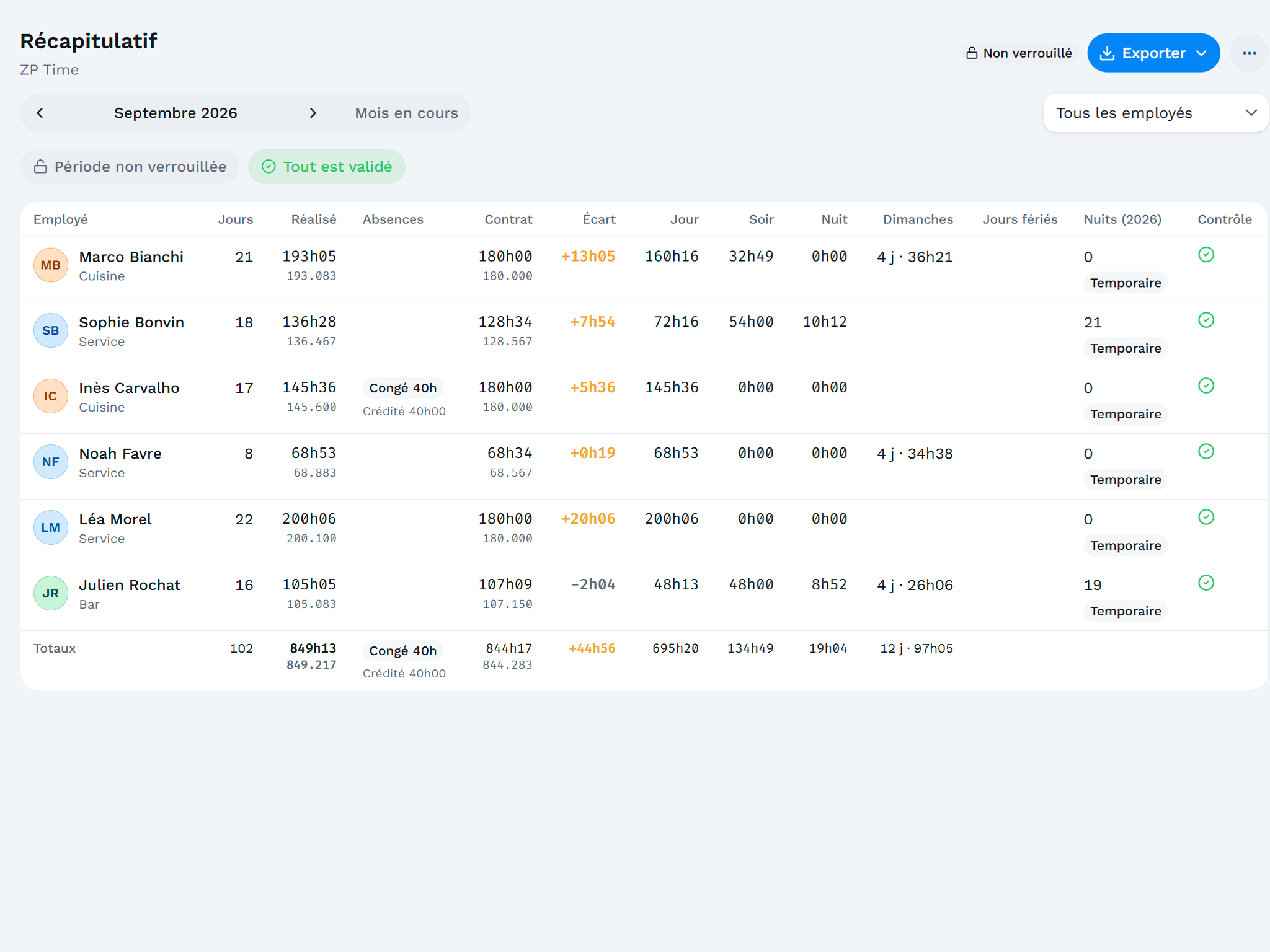
The monthly summary: day, evening and night hours, Sundays, credited absences and difference from the contract, ready to export.
Works with
The Windows touchscreen till at the heart of the suite, from shop to restaurant.
POZTEK Cloud
Coming soonManage one establishment or ten, wherever you are.
Frequently asked questions
Do I need a ZP till to use POZTEK Time?
Which tablet do I need for the time clock?
What happens if the internet goes down?
Can a missed clock-in be corrected?
Does POZTEK Time calculate salaries?
Are the public holidays those of my canton?
When will POZTEK Time be available?
Get notified when POZTEK Time launches.
Leave your email: we will write to you as soon as POZTEK Time is available.